















K1pool × GMiner

Official K1Pool.com & GMiner ASIC Firmware

Up to 40% higher hashrate and reduced electricity consumption
Extra 0% Quai Pool Fee for 30 Days
Boost hashrate up to 40%
Increase profitability with performance tuning depending on miner model.
Reduce power consumption
Optimized voltage/chip tuning lowers power draw without losing hashrate.
Performance & Overclocking
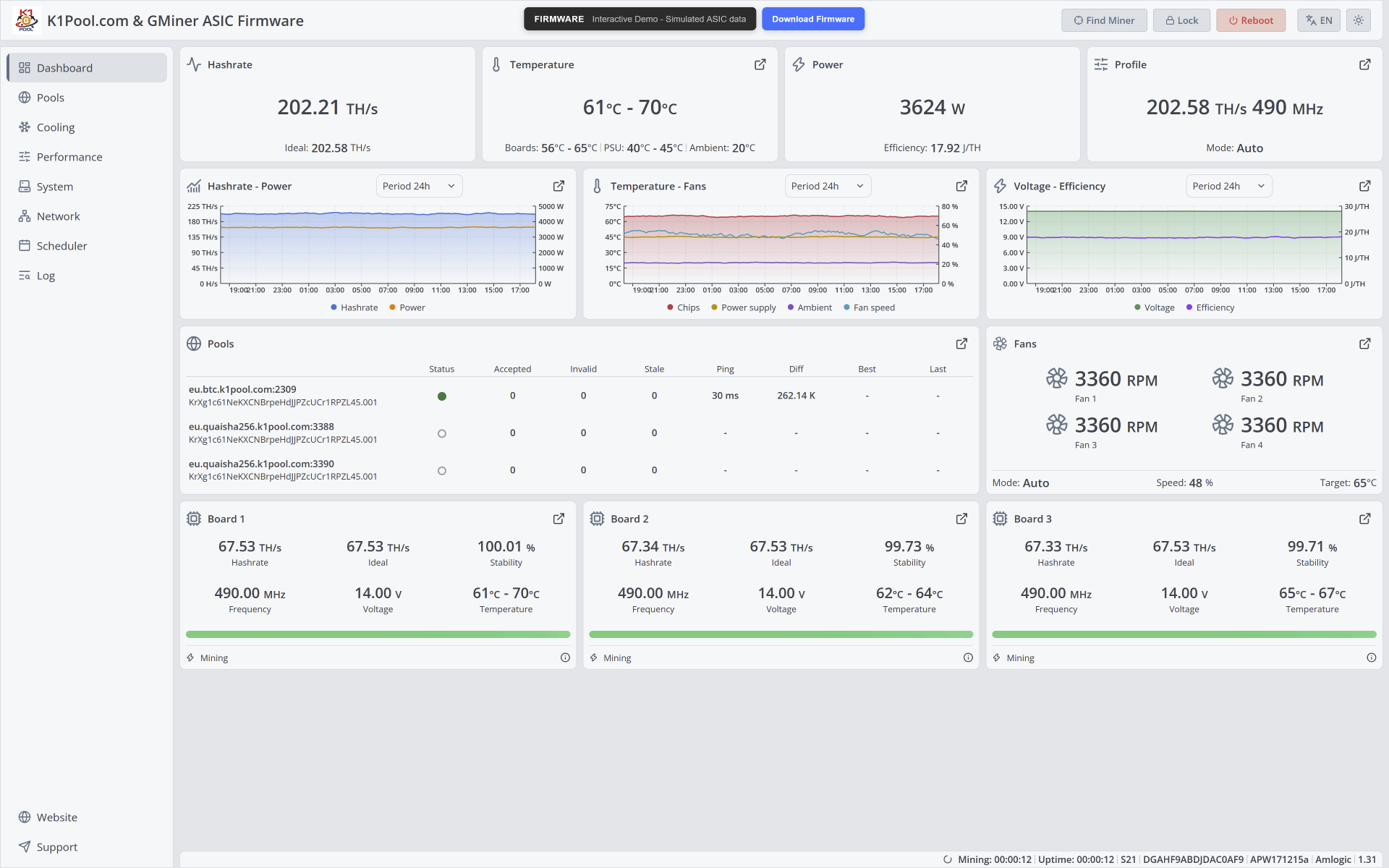
Autotuning, temperature-based switching, monitoring/recovery, manual per-chip tuning.
GMiner ASIC Firmware Features

The firmware was developed by mining experts, developers of the popular GPU miner GMINER. We have invested all our accumulated years of experience into developing high-quality firmware that meets all modern requirements for functionality, performance and security. This software was developed from scratch, with its own vision of the mining process and is not a rebranding or clone.

Performance & Autotuning

  • continuous autotuning technology
  • autotuning for selected overclocking profile
  • automatic switching profiles by temperature
  • per-chip frequency tuning
  • per-chip voltage optimization
  • problematic chip detection
  • real-time performance recovery
  • management of autotuned profiles

Cooling & Protection

  • automatic and manual cooling control
  • target temperature and fan speed control
  • quiet fan mode
  • watchdog for cooling system
  • watchdog for temperature sensors
  • watchdog for PSU voltage
  • watchdog for hashboards
  • faulty chip and board protection

Monitoring & Analytics

  • chip temperatures monitoring
  • power consumption monitoring
  • chip heatmap visualization
  • warning and error notifications
  • detailed mining statistics

Network & Pool Management

  • intelligent backup pool failover
  • automatic return to primary pool
  • DNS-over-HTTPS support
  • mining without internet connection
  • automatic and static network settings

Enterprise Management

  • Hiveon ASIC Hub integration
  • Foreman integration
  • BTC Tools compatibility
  • Toolkit fleet management
  • mass configuration support

Security & Convenience

  • reset, backup and restore configuration
  • support for withholding service fee
  • interface languages: English, Russian
  • customizable day and night display mode
  • one universal firmware for all supported device models
  • no penalty if commission pool is unavailable
Firmware Changelog
1.24 Latest

New Continuous Autotuning Algorithm

The new firmware version introduces a completely redesigned autotuning algorithm. Tuning is no longer limited to a single initial run: after the first parameter selection, the firmware continues to perform fine adjustments during mining.

This allows the miner to better adapt to changes in temperature, cooling efficiency, and other external conditions, maintaining more stable and energy-efficient operation.

Key benefits:
  • significant improvement in energy efficiency
  • automatic detection of problematic chips
  • adaptation to changing environmental conditions
  • keeping chips within the optimal stability range
  • precise voltage selection with 0.01 V increments
  • smooth tuning process with minimal additional load on the power supply

The algorithm works in two stages:
1. Initial tuning
Status: Autotuning
The firmware selects the basic optimal operating parameters for the miner.
2. Continuous fine-tuning
Status: Mining
The miner operates in normal mining mode, while the firmware continues to analyze chip performance and adjust parameters in the background.

Initial tuning usually takes approximately 1.5–3 hours. The most noticeable effect of continuous fine-tuning appears after approximately 12 hours of operation.

1.23
  • Added the ability to manage stock firmware from Toolkit: change pools, password, reboot the device, enable/disable blink mode. Pools can now be configured for both GMiner and Antminer firmware simultaneously.
  • Added the ability to manage GMiner firmware via the Antminer API with full support for BTC Tools and similar tools. The Antminer API protocol is outdated and insecure, so this feature must be enabled manually in the System section.
  • Improved GMiner API security.
  • Improved compatibility with hydro models.
  • Improved network scanning in Toolkit and added an offline status for devices with lost connection.
  • Note: for compatibility with the Antminer API, the password will be reset when updating to version 1.23. The default password is root.
1.22
  • Added support for S21+ Hyd: H6HB70701, H6HB70702, H6HB70704.
  • Added support for S21e Hyd: H6HB70801, H6HB70802.
  • Added support for APW11G0 power supply.
  • Added possibility to disable hash board cooling stage.
  • Improved miner stability.
1.20
  • Added support for Hiveon ASIC Hub.
  • Added heatmap coloring according to chip temperature.
  • Added use of the device serial number in the status.
  • Added support for APW111721b and APW111721c power supplies.
  • Added support for T19 Pro Hyd: HHB56702.
  • Added support for S19 Pro Hyd: HHB42602, HHB42701, HHB42711, TH401.
  • Added support for S19 Pro+ Hyd: HHB42601, HHB42631.
  • Added support for S19 XP Hyd: HHB56601, HHB56611, HHB56613, HHB56701.
  • Added support for S19 XP+ Hyd: HHB68701, HHB68703, HHB68704, H6HB68702.
  • Added support for U3S19XP+H: H1HB68601.
  • Added support for S19e XP Hyd: H6HB56702.
  • Added support for U3S19EXPH: H1HB56703.
  • Added support for S21 Hyd: HHB68501, HHB68502, HHB68503, HHB68504, HHB68505, HHB68601, HHB68602.
  • Added support for S21 Pro Hyd: H6HB70601.
  • Added support for S21e XP Hyd: H6HB70602.
  • Added support for S21 XP Hyd: H6HB70501.
  • Added support for U3S21EXPH: H1HB70601.
1.19
  • Extended voltage limits for power supplies, allowing higher profiles for autotuning.
  • Added S19k Pro submodels: BHB56906, BHB56907.
  • Added an option to set the time zone for correct time in downloaded logs.
1.18
  • Added chips heatmap for S21 Pro and S21 XP.
  • Added support for S19 XP+: BHB68707, BHB68709.
  • Added support for S21 XP submodel: A3HB70503.
  • Added display of ambient temperature for Amlogic control board: S21+, S21 Pro, S21 XP.
  • Improved compatibility with APW121215E power supply.
  • Added Toolkit statistics export to a CSV file.
  • Added display of errors and warnings in the web interface page header.
  • Added support for older operating systems in Toolkit, including Windows 7 without Direct3D 12.
  • Decreased Toolkit executable size by 10 MB. Current Toolkit size is 37 MB as an offline installer with embedded firmware for all control boards.
1.17
  • Toolkit: added display of hashboard status with the ability to view errors by hashboard.
  • Toolkit: added the ability to enable/disable miner search mode.
  • Miner: improved compatibility with power supplies.
  • Miner: added backup saving for EEPROM, allowing the miner to start even if there are EEPROM issues.
  • Miner: improved network connection failure handling logic.
  • Web Interface: when switching performance profiles in manual temperature tuning mode, selected temperature tuner settings are saved.
1.16
  • Improved fan control algorithm in auto mode.
  • Added the ability to configure quiet fan mode in Toolkit.
  • Added the ability to configure "do not stop mining when the internet connection is lost" in Toolkit.
  • Improved support for S21 Pro and S21 XP devices.
1.15
  • Added quiet fan mode: fan speed 50% while hash board cooling.
  • Added option to allow mining without internet, allowing the ASIC to stay at working temperature.
  • Improved compatibility with mining pools and fixed bugs with some pools.
1.14
  • Added S21 Pro support: A3HB70601, A3HB70602, A3HB70603.
  • Added S21 XP support: A3HB70501, A3HB70502.
  • Added Cvitek control board support. After reboot, the control board rolls back to stock firmware. Keep Toolkit open to launch GMiner firmware after reboot.
1.13
  • Added the ability to install GMiner on Bitmain stock firmware from late February 2024, including firmware from 2025. Downgrading the stock device to an older firmware version is no longer required.
  • Improved logic for returning from a backup pool to the main pool.
  • Added S21+ submodels support: A3HB70702, A3HB70703.
1.12
  • Improved logic for switching to backup pools, including detection of provider domain blocking and switching to the next pool.
  • Reworked the option to ignore broken temperature sensors. At least one working temperature sensor is now required for mining. Specifying a minimum number of working sensors is no longer required.
  • Added an option to enable/disable DNS over HTTPS, allowing pool addresses to be hidden from the provider.
1.11
  • Added power efficiency mode for T21, S21, S21+, S21 Pro and S21 XP. It can be enabled in the Performance section. In testing, this mode improved power efficiency by 0.5-1 J/T on S21+ 235T.
1.10
  • Improved performance optimizer in mining mode.
1.09
  • Miner: added option to disable performance optimization after auto-tuning and in manual mode.
  • Miner: added option to ignore abnormally slow chips during auto-tuning and performance monitoring.
  • Toolkit: fixed a bug that could cause random operation failures during update, configuration, reboot and similar actions.
1.08
  • Miner: added option to ignore chip temperature sensors for T21/S21. When enabled, the miner uses temperature from sensors on the hashboard.
  • Toolkit: added sorting by pool address and pool username.
1.07
  • Miner: added display of total mining time.
  • Toolkit: added operation manager for background device management.
  • Toolkit: added sorting by IP address, hashrate, frequency, voltage, power consumption and uptime.
  • Toolkit: added statistics display for stock and third-party firmware, including hashrate, frequency, voltage, temperature, fan speed and power consumption.
  • Toolkit: added display of device uptime.
  • Toolkit: UI improvements and bug fixes.
1.06
  • Toolkit: added display of fan speed, pool information, temperature limit, cooling mode and profile.
  • Toolkit: added password change functionality.
  • Toolkit: added enable/disable sleep mode.
  • Toolkit: added filters by device model, firmware type, firmware version, status, pool address, pool username, control board and power supply.
1.05
  • Miner: added option to control maximum fan speed in auto cooling mode.
  • Toolkit: added mass configuration for pools, cooling mode, performance profiles and temperature tuner.
  • Toolkit: added ability to rollback firmware and reboot device.
  • Toolkit: automatically authorizes in the web interface when opening from Toolkit.
  • Note: to use new Toolkit features, update firmware to GMiner v1.05 via Toolkit or web update.
1.04
  • Updated Toolkit.
  • Toolkit: added light/dark theme.
  • Toolkit: added English/Russian language.
  • Toolkit: added ability to monitor device statistics, including hashrate, temperature and power.
1.03
  • Fixed a bug that caused revert back to stock firmware on some Amlogic control boards.
1.02
  • Added settings to configure time intervals for lowering/raising current profile by temperature.
  • Added additional logs for power supply failures.
1.01
  • Added S19j Pro+ submodel: BHB42612.
  • Made Toolkit compatible with 32-bit architecture.
  • Adjusted limits for profile switching by temperature.
  • Added seamless profile switching by temperature.
  • Added warning display when lowering current profile by temperature.
  • Note: Toolkit allows flashing a device on stock firmware and updating a device with GMiner firmware to the latest version.
1.00
  • Fixed installation failure on Xilinx 7007 control boards.
0.99
  • Increased timeout for firmware installation via Toolkit for slow networks.
  • Increased maximum temperature setting to 120°C.
0.98
  • Prohibited mining in case of faulty hash board on devices without PIC.
0.97
  • Fixed installation failure on Xilinx 7007 control boards.
0.96
  • Added support for Foreman.
0.95
  • Initial public release.
  • Note: .gmu file for web update.

Installation (4 Steps)

1) Download Toolkit
Download and launch Firmware Toolkit.
2) Scan Network
Create group, set local IP range, run scan.
3) Install Firmware
Select miner and click “Install Firmware”.
4) Finish & Reboot
Wait for completion; miner reboots automatically.

Supported Models

Name Models
T19 Pro HydHHB56702
S19BHB42801, BHB42803, BHB42811, BHB42821, BHB42831, BHB42841
S19 ProBHB42641, BHB42651
S19 Pro HydHHB42602, HHB42701, HHB42711, TH401
S19 Pro+ HydHHB42601, HHB42631
S19j+BHB42701
S19j ProBHB42601, BHB42603, BHB42621, BHB42631, BHB42632
S19j Pro+BHB42611, BHB42612
S19 XPBHB56601, BHB56701, BHB56801, BHB56802, BHB56806
S19 XP HydHHB56601, HHB56611, HHB56613, HHB56701
S19 XP+BHB68707, BHB68709
S19 XP+ HydHHB68701, HHB68703, HHB68704, H6HB68702
U3S19XP+HH1HB68601
S19e XP HydH6HB56702
U3S19EXPHH1HB56703
S19j XPBHB56804, BHB56807, BHB56814
S19k ProBHB56901, BHB56902, BHB56903, BHB56906, BHB56907
S21BHB68601, BHB68603, BHB68606
S21 HydHHB68501, HHB68502, HHB68503, HHB68504, HHB68505, HHB68601, HHB68602
T21BHB68701, BHB68703, BHB68705
S21+A3HB70701, A3HB70702, A3HB70703
S21+ HydH6HB70701, H6HB70702, H6HB70704
S21e HydH6HB70801, H6HB70802
S21 ProA3HB70601, A3HB70602, A3HB70603
S21 Pro HydH6HB70601
S21 XPA3HB70501, A3HB70502, A3HB70503
S21 XP HydH6HB70501
S21e XP HydH6HB70602
U3S21EXPHH1HB70601

Compatible with supported models. Make sure your ASIC is running firmware released before March 2024.

Supported Control Boards: Xilinx, BeagleBone, Amlogic, CVItech

Download Firmware Toolkit

Install firmware via Toolkit utility and follow the 4-step flow above.
Download Toolkit

Trust & Safety

  • Official K1pool & GMiner collaboration
  • No hidden dev fee
  • Rollback/recovery options
  • Real-time monitoring support

FAQ

Will firmware void warranty?
Depends on vendor policy. Check before installation.
How to rollback?
Use recovery/rollback in Toolkit or reflash stock image.
What if miner goes offline after flash?
Re-scan network, check IP/subnet, then recovery mode.
Which pools are supported?
Standard stratum-compatible pools; verify per model/profile.