




 English
 русский
 中文
 español
 português
- Mining Pools
- NEB Pool
- How To Start
How To Start Mining Neural Engine Byte
Your Kr wallet
Create an account to get a Kr wallet: one internal wallet for all pools. Mining without an account is not supported.
Pool address
stratum+tcp://eu.neb.k1pool.com:3370
Kr_WALLET.rig1
x
Step-by-step setup
 HiveOS
Suprminer
Linux
Windows
INVminer
Linux
Windows
WildRig-NG
Linux
./wildrig-ng --algo nebhash --url stratum+tcp://eu.neb.k1pool.com:3370 --user Kr_WALLET --worker RIG_NAME --pass xWindows
HiveOS - Suprminer (NVIDIA)
In the Flight Sheet choose Custom miner, then Setup Miner Config: miner name suprminer-neptune, set Hash algorithm to neb, and set the installation URL:
https://github.com/ocminer/suprminer/releases/download/v1.9.50/suprminer-neptune-1.9.50_u2204.tar.gz{
"name": "NEB Suprminer K1",
"isFavorite": false,
"items": [
{
"coin": "NEB",
"pool_ssl": false,
"dpool_ssl": false,
"miner": "custom",
"miner_alt": "suprminer-neptune",
"miner_config": {
"url": "stratum+tcp://eu.neb.k1pool.com:3370",
"pass": "x",
"miner": "suprminer-neptune",
"template": "%WAL%.%WORKER_NAME%",
"install_url": "https://github.com/ocminer/suprminer/releases/download/v1.9.50/suprminer-neptune-1.9.50_u2204.tar.gz",
"user_config": "",
"algo": "neb"
},
"pool_geo": []
}
]
}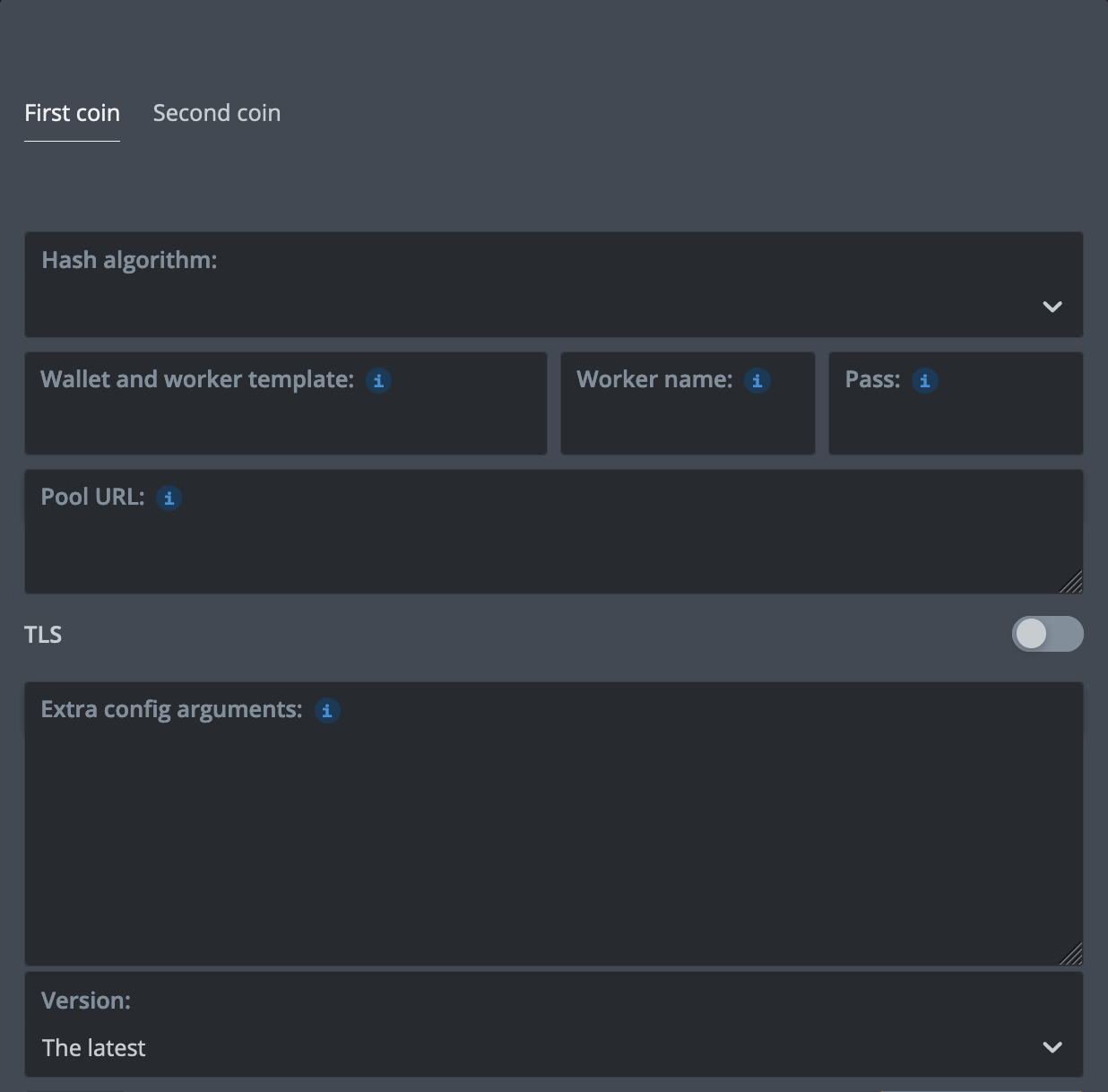
%WAL% - K1Pool wallet Kr_WALLETPass - x%URL_HOST%, %URL_PORT% - select K1Pool server in the Flight SheetHiveOS - Suprminer (AMD)
In the Flight Sheet choose Custom miner, then Setup Miner Config: miner name suprminer-neptune, set Hash algorithm to neb, and set the installation URL:
https://github.com/ocminer/suprminer/releases/download/v1.9.50/suprminer-neptune-1.9.50_opencl_u2204.tar.gz{
"name": "NEB Suprminer AMD K1",
"isFavorite": false,
"items": [
{
"coin": "NEB",
"pool_ssl": false,
"dpool_ssl": false,
"miner": "custom",
"miner_alt": "suprminer-neptune",
"miner_config": {
"url": "stratum+tcp://eu.neb.k1pool.com:3370",
"pass": "x",
"miner": "suprminer-neptune",
"template": "%WAL%.%WORKER_NAME%",
"install_url": "https://github.com/ocminer/suprminer/releases/download/v1.9.50/suprminer-neptune-1.9.50_opencl_u2204.tar.gz",
"user_config": "",
"algo": "neb"
},
"pool_geo": []
}
]
}%WAL% - K1Pool wallet Kr_WALLETPass - x%URL_HOST%, %URL_PORT% - select K1Pool server in the Flight SheetHiveOS - INVminer
In the Flight Sheet choose Custom miner, then Setup Miner Config: miner name invminer, leave Hash algorithm empty, and set the installation URL:
{
    "name": "NEB invminer K1",
    "isFavorite": false,
    "items": [
        {
            "coin": "NEB",
            "pool_ssl": false,
            "dpool_ssl": false,
            "miner": "custom",
            "miner_alt": "invminer",
            "miner_config": {
                "url": "stratum+tcp://eu.neb.k1pool.com:3370",
                "pass": "Kr_WALLET",
                "miner": "invminer",
                "template": "%WAL%.%WORKER_NAME%",
                "install_url": "https://github.com/getrigeos/INVminer-Release/releases/download/v2.2.0.23/invminer-2.2.0.23.tar.gz",
                "user_config": "--coin neb"
            },
            "pool_geo": []
        }
    ]
}%WAL% - your NEB address (neb1...)Pass - K1Pool wallet Kr_WALLET%URL_HOST%, %URL_PORT% - select K1Pool server in the Flight SheetHiveOS - WildRig-NG
In the Flight Sheet choose Custom miner, then Setup Miner Config: miner name wildrig-ng-custom, set Hash algorithm to nebhash, and set the installation URL:
{
    "name": "NEB WildRig-NG K1",
    "isFavorite": false,
    "items": [
        {
            "coin": "NEB",
            "pool_ssl": false,
            "dpool_ssl": false,
            "miner": "custom",
            "miner_alt": "wildrig-ng-custom",
            "miner_config": {
                "url": "stratum+tcp://eu.neb.k1pool.com:3370",
                "pass": "x",
                "miner": "wildrig-ng-custom",
                "template": "%WAL%.%WORKER_NAME%",
                "install_url": "https://github.com/andru-kun/wildrig-ng/releases/download/1.0.1/wildrig-ng-custom-1.0.1.tar.gz",
                "user_config": "",
                "algo": "nebhash"
            },
            "pool_geo": []
        }
    ]
}%WAL% - K1Pool wallet Kr_WALLETPass - x%URL_HOST%, %URL_PORT% - select K1Pool server in the Flight SheetStep 1 - Register
Step 2 - Download mining software
Neural Engine Byte is mined on GPUs. Every attempt is one training step of a small neural network, so the miner needs the network's dataset file, neb-datasets.bin (16 MB): Suprminer downloads and verifies it on its first start.
Download Suprminer 1.9.50 from its GitHub release (no miner fee). It runs on NVIDIA GTX 16 series and newer (CUDA; driver 580 or newer) and on AMD cards (OpenCL): take the package for your GPU vendor and system, the AMD ones are named _opencl.
- Linux and Windows: the archives on the release page. Unpack the whole archive into one writable folder and run the command above; the binary is
suprminer-neptuneand the algorithm-a neb. - HiveOS: the installation URL on the HiveOS tab above (Ubuntu 22.04 image; for a 20.04 image use the
_u2004package of the same release). - Add
-d 0,1to pick GPUs. For an encrypted connection usestratum+ssl://with the same host and port.
Or download INVminer 2.2.0.23 from its GitHub release (no miner fee on NEB). It runs on NVIDIA:
- Linux, CUDA 12 (driver 12.0+, RTX 50 series: R570+): invminer-v2.2.0.23-linux-x86_64-cuda12.tar.gz
- Linux, CUDA 13 (driver R580+): invminer-v2.2.0.23-linux-x86_64-cuda13.tar.gz
- Windows x64: invminer-v2.2.0.23-windows-x86_64.zip. Run the command above in Command Prompt or PowerShell: the
start-neb.batin the archive mines on another pool's servers. - HiveOS: the installation URL on the HiveOS tab above.
INVminer takes a NEB address as the user name, so the K1Pool account goes in the password (-p). Replace NEB_ADDRESS with your NEB address (neb1...), the one set as your NEB payout address in your K1Pool profile. Shares and payouts go to your K1Pool account; the address only lets the miner start. Add --cpu-mode low to use less CPU.
Or download WildRig-NG 1.0.1 (beta) from its GitHub release (2% developer fee on NEB). On NEB it runs on NVIDIA RTX 30 series (Ampere) and newer and on AMD RX 5000 series (RDNA 1) and newer:
- Linux: wildrig-ng-linux-1.0.1.tar.gz
- Windows x64: wildrig-ng-windows-1.0.1.zip
- HiveOS: the installation URL on the HiveOS tab above (custom miner
wildrig-ng-custom).
Replace Kr_WALLET with the account address received in Step 1. You can change RIG_NAME; use up to 32 Latin letters, digits, "_" or "-".
Do not run other programs on the same GPU while mining: the miner keeps its tables in the free video memory. The hashrate differs between blocks, about tenfold: even blocks train on the Kepler dataset and odd blocks on TESS, and the pool keeps a share difficulty for each.
Step 3 - Check the mining status
Step 4 - Getting Started with Cryptocurrency Payouts (NEB)
To receive pool payouts you need a NEB address: it starts with neb1 and is 62 characters long. Create one with the official wallet, neb-wallet:
Keep the wallet file and its password: nobody can restore them. A block's reward can be spent 100 blocks after it was found, about an hour and forty minutes, and is credited to your balance then. Payouts are sent every 8 hours for balances over the threshold; the minimum payout is 1 NEB. All miners of a payout are paid by one transaction and share its network fee equally, usually a few thousandths of a cent each.
After creating a NEB wallet, add it on the Wallets page, set the minimum payout threshold and confirm the wallet address by email.